Build log · 01
Assembling the phone
A Raspberry Pi, a handset, and the discovery that the audio path, not the AI, was the entire project.
The device this post describes is a prototype. It is not a product, there is no custom circuit board in it, and most of what makes it work is a few hundred lines of Python fighting with a cheap microphone. That is precisely why it is worth writing down: almost none of the hard parts were where we expected them to be.
Why a telephone at all
We started, as everyone does, with a smart speaker. It failed. What we got wrong was why it failed. We assumed the problem was the menus, the wake word, the invisible list of things you're allowed to say.
It wasn't. The problem was physics. A voice coming out of a speaker on a sideboard, three metres away, is close to the hardest possible way for someone with age-related hearing loss to receive speech. The sound arrives quietly, mixed with room reflections, competing with everything else in the flat. A hearing aid doesn't fix that; in some rooms it makes it worse.
A handset held against the ear delivers speech directly, at close range, and works alongside a hearing aid. It also requires no eyesight at all.
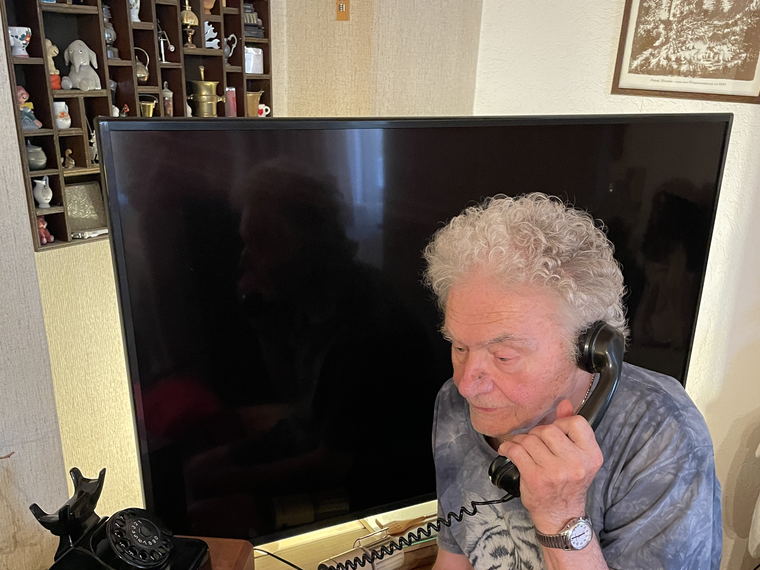
And there was already one in the flat: an old rotary phone on a side table, an object he had used competently for sixty years. That was the whole idea. Nothing about it needs to be learned.

What is actually inside
A Raspberry Pi, a USB handset, and the phone's own mechanics as the interface. That last part matters more than the compute.
- The hook switch is the on/off button. The phone's original switch runs to a GPIO pin with an internal pull-up: off the hook reads low, on the hook reads high. The control loop polls at about 10 Hz and requires two consecutive agreeing reads before it believes a change, because a mechanical leaf contact from the 1960s bounces.
- Lifting the handset starts a call. Replacing it ends the call. There is no other control. This is also the privacy model: the microphone is doing nothing at all until someone physically picks up the receiver.
-
Audio goes through ALSA, routed to the USB audio card through
the
plugplugin so the software can pick its own sample rate and let ALSA handle the conversion.

That's it for hardware. Everything difficult that follows is about making a weak, noisy, echo-prone analogue path good enough for a speech model to understand an elderly man who talks quietly.
The audio path was the whole project
We budgeted a weekend for audio. It took months, and it is still the part we touch most often. Five problems, in the order they hit us.
1. The microphone capsule is very weak
Straight out of the handset, his voice arrived at roughly −48 dBFS. That is faint enough that a speech model receives mostly ambience. There is no hardware gain to turn up on a cheap USB dongle, so the fix is a software makeup gain applied before anything else sees the signal. It is adjustable from 1× to 20× in the caretaker dashboard, because the right value changes when you change any part of the chain.


2. Mains hum
A steady 50 Hz buzz sat underneath everything, well below the telephone voice band but loud enough to eat headroom and confuse the automatic level control. Two fixes, both needed: a 300 Hz high-pass filter defined directly in the ALSA config, so the hum is gone before Python ever sees a sample, and a USB isolator between the Pi and the audio dongle to break the ground loop causing it in the first place.
3. Levelling and noise
People don't speak at a constant volume, and he speaks more quietly when he's tired. Raw makeup gain makes the quiet parts audible and the loud parts clip. So the mic runs through WebRTC's noise suppressor and automatic leveller/limiter, the same audio front-end Home Assistant's voice assistant uses. It evens out how loudly he speaks, tames the hum harmonics the high-pass can't reach, and hard-limits peaks so a high boost can never clip.
That processor only accepts 16 kHz audio in 10 ms frames, so every device frame is resampled down, processed in 160-sample blocks, and resampled back. It also adapts over the course of a call, which means one instance lives per call and must be fed only genuine speech from the person, never the earpiece's own echo. Feed it the echo and it slowly learns to suppress the wrong thing.
4. The handset has no echo cancellation
This one is structural. In a normal speakerphone, a chip cancels the speaker's output out of the microphone signal. A gutted handset has no such chip, so the earpiece bleeds straight into the mouthpiece a few centimetres away. The voice model, listening for the user to start speaking, hears itself and treats it as an interruption. The conversation collapses into the assistant interrupting itself.
The blunt fix is a half-duplex echo guard: mute the microphone whenever the earpiece is playing. It works perfectly and costs you the ability to interrupt, which for a slow talker who needs to say “Moment, langsamer” is a real loss. So there is also an optional acoustic echo canceller (SpeexDSP) with a filter tail long enough to cover the speaker-to-mic delay, running against a time-aligned buffer of exactly what was played. When it's on, interruption works at full volume. Getting it to converge reliably is ongoing.
5. Every voice backend wants a different sample rate
One provider streams at 24 kHz, another at 16 kHz. Rather than reconfigure the sound card each time (which on a Pi means a fresh chance for ALSA to refuse to open the device), the audio device stays at one fixed rate and a small linear-interpolation resampler sits at the boundary. Swapping providers became a settings change instead of a hardware argument.
After every hardware change, measure
The lesson that saved us the most time: never adjust audio by ear. Changing the dongle, the isolator, or the capsule invalidates every gain setting you had, and "it sounds fine to me" is worthless when the listener is 93 and the talker is not you.
So there's a diagnostics script we run from a laptop after touching anything physical. It finds the capture card and prints its real control names, maxes the hardware capture volume and enables any gain control a new card happens to expose, measures the ambient noise floor and the 50 Hz hum on the raw mic versus the high-passed device (that is how we confirmed the isolator actually worked), and then analyses the most recent call recording to compare his voice level against the assistant's and recommend a boost value that lands him at about −18 dBFS.
It prints a number. A human types that number into the dashboard. Deliberately not automatic: if the recommendation is ever wrong, we want to have seen it.

Making it behave like a phone, not a computer
Once audio worked, the remaining work was all about not breaking the illusion. A telephone has behaviours, and the moment the object stops obeying them it becomes a computer again, which is the one thing it must never be.
- It rings. For a due medication reminder the handset rings for 30 seconds; for an incoming real call, 60, because he needs time to reach it. The ringer raises the ALSA output to full volume while it's active and restores the previous level afterwards.
- It has a disconnect tone. If the handset is left off the hook after a call ends, it plays the same off-hook tone a real phone would, on a loop. Otherwise the phone is simply dead and there is no way to know why.
- It plays hold music. When the AI goes away to search the web, there's music. Silence on a telephone with no screen means the line has dropped.
- It places real calls. Ask it to ring your daughter and it does, as an actual telephone call, via a SIP client registered to the router as an IP phone. The catch is that the sound card can only belong to one process, so the AI session has to be fully torn down to free the audio device before the call can start, then rebuilt when the call ends.
It had to survive the move
Building it on a desk is one thing. It then went into a flat several hundred kilometres away, belonging to someone who cannot read a screen. Three things made that survivable:
- Wi-Fi setup with no screen and no keyboard. If it can't find a known network, the Pi becomes an access point with a captive portal. A visiting family member joins it from a phone and picks the household network from a list.
- Restart, always. It runs as a systemd service that restarts on any crash. Nobody in that flat can be asked to reboot anything, and "have you tried turning it off and on again" is not available to us.
- Remote access that survived the relocation. A private mesh VPN, so deploying an update works exactly the same from our desks as it did when the phone was on one of them.

What it cost, honestly
Roughly €80–130 in parts, depending on which build you count and what you already own. The single most expensive line item is a second-hand telephone.
What we'd do differently
- Choose the handset for its microphone, not its price. Every hour we spent on gain staging, levelling and hum traces back to a capsule that was too weak and too noisy. A better one would have been cheaper.
- Fit the USB isolator on day one. We spent a long time filtering a hum we could have simply not created.
- Expect the audio path to be the project. The shell is an afternoon. The AI is an API call. Getting a quiet, hard-of-hearing voice cleanly into a model, and the model's answer cleanly back into an ear, is the work.
Next: what happened when it actually went into his flat, and the three things six weeks of real calls taught us that we could not have designed in advance.